MI box S + Ugreen ethernet adapter getting 20 mbps?

Hi new to all this stuff and so I recently purchased the following items:

MI box S

Ugreen adapter

Ethernet cable

My connection is 200 mbps and when using other devices (ethernet or wifi), I get at least 100+. While on wifi 5g with the MI box, I do get around 120-150ish but it is a bit unstable so I wanted to use the adapter. However when I use it, it fluctuates between the teens to maybe 20s? If I'm lucky maybe 30s?

Am I doing something wrong? Any suggestions?

Thanks

3 Answers

Multiple accounts on android tv 9?

Hi,

I'm looking to get the new nvidia shield tv which runs android 9.

So any of your fine people know if it allows multiple accounts and the ability to switch between them?

1 Answers

Is aptoide tv good?

3 Answers

Facebook android tv app

When facebook will update and fix the android tv app

The facebook app 1.0.7 is very bad

Laggy slow and sometimes it crashes and do loading again :/

3 Answers

Any update for SHIELD Wireless Controller 2019 (Game pad)?

Being in India, I am planning to get a new Shield Pro 2019 through my friend in US. I would like to get a Wireless gaming controller too, but unable to find any news on any updated hardware. Is there any updated controller available, or in pipeline, or no such plan? Any idea?

1 Answers

Confirmed: remapping Netflix button on new remote is possible

In case anyone wants to remap the Netflix button, go grab Button Mapper by flar2 from the playstore. Upon opening, you'll click the "add button", and then assign whatever function or hotkey you want for it. I briefly tested it out as a hotkey to load Kodi, and it was working nicely. Currently have it set as a pause/play button. There's quite a numerous amount of remapping options with it, including disabling it.

Others that have used this app in the past will recall bugs that it presented after which Nvidia fixed in update. So far I'm not noticing any . Please share your experience and feedback if encountering any.

✌️

8 Answers

2017 Shield vs 2019 Shield - worth the upgrade?

I have a Dolby Vision capable TV but that alone wouldn't be worth the upgrade for me.

However, is the 4K upscaling of the 2019 model dramatically better than the 2017 model? That might be worth the upgrade for me.

4 Answers

For anyone turned off by the new Nvidia remote design, this is for you...

Just setup the 8gb tube and I'll briefly mention that the resolution is noticeably better, but this post is regarding the remote. I was initially super disappointed when the new gen leaked online recently. I didn't care for the pyramid shape remote at all or the fact that it cannot lay flat.

However, I'm totally digging it now. Not only does it feel super responsive, it feels very ergonomic in the hand. They didn't cut any corners on build quality imo. The buttons feel premium, voice is working as expected, and i was pleasantly surprised to see the settings/hamburger button is customizable with these 13 hotkey options:

Mute, open a quick setting, send menu command to app, take screenshots, open recent apps view, close all backround apps, toggle AI upscaling, AI upscaling, match frame rate. This list and features will be expanded in future release, with long/short press, double tap mapping according to one Nvidia source.

Also love the backlighting and brightness and duration control.

I hope to see some 3rd party tpu cases this time around, for drop protection.

That's all. Thought it might help some of you on the fence like i was.

Happy streaming. ✌️

9 Answers

Nvidia Shield TV Pro 2019

Just picked one up from BB. My first Shield TV, looking to use it exclusively to run a Plex Server. Low power consumption was a major draw over using a HTPC. Plex playback is just 2 devices (1080p), one local on the Shield TV itself (for the TV that its hooked up to) and one other TV that is at another location on a different internet connection (300mbps). It's gonna be on ethernet right into my router and using a Samsung T5 for adaptable storage. Anyone have any tips/experience with it for this purpose? Will it be powerful enough? I guess I'll try it out for myself tonight, but was just looking for any knowledge anyone may have had with this already.

2 Answers

Philips tv red light flasging, but stops when covered with something

7 Answers

Hey, new Shield TV owners!, can you please test Dolby Audio conversion (DD+ to DD conversion)?

[deleted]

5 Answers

How / where to purchase new nVidia Shiled TV Pro 2019 ?

New model is out today - https://www.nvidia.com/en-us/shield/shield-tv-pro/

However, where/how to purchase it for EU market? I can not find it on amazon.de , nor offical nVidia shop supports it (only USA and Canada...)

2 Answers

Definitely the best app for Android tv - PVR LIVE

This is my #1 app tip if u have an Android tv, know which PVR source you're using and want to watch live tv, pause or record series and movies. It works great if you use tvmosaic, TVHeadend and others as a backend.

Read more about the app :https://play.google.com/store/apps/details?id=se.hedekonsult.pvrlive

and here's some excellent help through an awesome youtuber - if you need it :) https://www.youtube.com/watch?v=nseDK57aKts

Kindly / Ablooom <3

9 Answers

Shield Pro 2019 Internals

I have an old shield Pro with a hard drive. Any chance I can transplant the hard drive to the new one? I haven't seen any teardowns.

3 Answers

Which Mi box do I choose?

Guys, I've settled on getting a Mi box for my online streaming (Netflix, Youtube). Which model is the most compatible for streaming YT, Netflix in 4k? I've seen original MI box. There's also mi box S, mi box 4C. etc. What are the differences? They say they (almost all?) support 4k. So...

Can you recommend me which one is the best for 4k streaming, especially Netflix. Thanks ;D

4 Answers

New Shield live on Best Buy

1 Answers

Help Needed. Unknown device sending pairing requests to Mi tv

So, there is a bluetooth device named "KN320" sending pairing requests continuously even after cancelling. Is there anyway to block the device?

2 Answers

New Shield for sale on Nvidia website and remote will also be sold separately.

13 Answers

[Controller] Samsung Gear VR Controller ($1.99 / 95% off)

[deleted]

1 Answers

Mi Box 3 Auto Refresh Rate changes resolution

Hi all!

I have a 4K TV, but since I use the Mi Box mostly for 1080p contect, I have force-set the resolution to 1080p 50Hz (auto-switch resolution is off) for taking advantage of the better TV upscaling features.

The problem comes with auto refresh rate switching apps like SIPTV, Perfect Player, Plex or even the Refresh Rate tool. They all can change the frame-rate according to the content without a problem, but they also change the resolution to 2160p, losing all the upscaling features of the TV in the process.

Is this a known problem of the Mi Box?

3 Answers

On Demand with an Xfinity login

Any way to do this?

2 Answers

Stan.com.au Android TV APK Request

Would someone who has access to the Australian play store be willing to extract and post the latest Stan Android TV apk? I found one on APK mirror, but it’s super outdated.

Thanks in advance!!

2 Answers

Question using AndroidTV phone remote app w/Element 55" 4K UHD Smart Android TV

Hey all I picked up an Element 55" 4K UHD Smart Android TV (E4STA5517) at target for a great price, floor model without the remote control. I thought it would be fine just to use the app instead plus connect a roku when I purchased. However I'm running into an issue pairing - when I initiate the pair on the remote app, it pops up the pairing request with the same code on both devices, I tap pair on the app but the tv still apparently needs me to select 'Pair' also.

Any suggestions on how can I complete this pairing? And would a universal remote work on the tv? Grasping here...

2 Answers

Can you recommend screensaver apps?

Can anyone recommend screensaver apps? I would especially want one that I can point to say a pinterest album to show the pics.

I found an app for "dreamy" but it only uses 1 source from unsplash or something. Thanks!

10 Answers

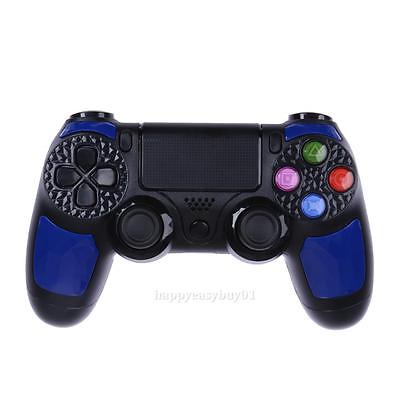
Bluetooth/Wireless/Wired Android TV Compatible Game-pad

Hi,

i have searched trying to get a list of official compatible Gamepads but i didn't get a list anywhere

because people always mixing between Android TV boxes and Actual Android TV.

if you have a gamepad which is compatible list it in the comments the name , more info, photo and link to order etc

starting the List

*#############################################################################

Below list is fromNvidia supportforums which is compatible with Shield TV

which should work for other Android TV

*#############################################################################

Shield TV Compatible Gamepads.

- 8Bitdo NES30 Pro Bluetooth Gamepad

- 8bitdo SF/SN30 Pro

- 8Bitdo ZERO Mini Portable Bluetooth Controller (Missing L2, R2 and Home buttons)

- Afterglow PS3 Wireless

- Amazon Fire TV Game Controller

- Aweek T3 Bluetooth Controller Android Wireless Gamepad

- BEBONCOOL Switch Controller (Bluetooth)

- Buffalo Classic USB Gamepad for PC

- EasySMX USB Wired Game controller esm-9100

- GameSir G3s Bluetooth Wireless Controller

- HORI Xbox 360 Real Arcade Pro VX SA KAI

- Intsun T3 Wireless Bluetooth Game Controller Gamepad Joystick for Android

- Ipega 9021 (Also have mouse mode)

- Ipega 9025

- Ipega 9028

- Ipega 9037

- Kingear Terios / Te Leishi T3 Bluetooth Wireless Game Controller Gamepad Android Phone

- Lenovo ThinkPad Compact Bluetooth Keyboard with TrackPoint - US English

- Logik LPS3KIT14 PS3 Gamepad (Bluetooth/USB Gamepad) (Only wired USB mode works)

- Logitech F310 gamepad

- Logitech F710 (Only volume control don't work)

- Logitech Dual Action G-UF13A Buttons works, but usable if triggers is not needed in games.

- Mad Catz CTRLr Gamepad (Bluetooth)

- Mayflash Arcade Fighting Stick V2 (Xbox 360 / PS3 / PC)

- Mayflash GameCube Controller Adapter for Wii U and PC USB (2 ports, Purple. Set it to PC Mode)

- Mayflash GameCube Controller Adapter for Wii U and PC USB (4 port, Black casing)

- Mayflash N64 to PC USB Controller Adapter

- Mayflash PC USB Adapter for Wii U Pro Pad. (Dinput and XInput support)

- Mayflash PS3 wireless adapter (Only in xinput mode with a single controller at a time). All DS3 buttons work the same way as the Shield controller in xinput mode.

- Mayflash SNES Controller to Adapter for PC USB

- Microsoft Official Xbox 360 Wired USB Gamepad

- Microsoft Official Xbox 360 Wireless Gamepad. (Needs official MS Reciever) (Blinking LED is fixed in Android 7.0 update)

- Microsoft Official Xbox One S Bluetooth Gamepad (Works with nov 2016 firmware)

- Microsoft Xbox One Wireless Controller Combat Tech Special Edition

- MiGamepad/Mocast Bluetooth Mini Gamepad/Media Remote (2 Modes)

- NanoRS RS600 Maclean Racing Controller

- NES - USB PC Retro Gaming Controller Gamepad Classic NES Style Pad

- Nintendo NES Classic USB Gamepad

- Nyko Playpad Pro For Android (Bluetooth. Also have Mouse mode.)

- Pro Qanba Q1SW Full Sanwa

- Retrolinc USB SNES Gamepad

- Retronic Design USB Adapter. Flashable (Supports 50 +/- controllers)

- Sony PS3 USB Wired Gamepad (Connect it with a USB cable, go to settings, then ps3 controller under remote and accessories, press the ps button and disconnect the usb. Now PS3 Gamepad works wireless)

- Sony PS4 USB Wired Gamepad

- Sony DualShock 4 V2 (Works natively with Shield TV update 7.0)

- Speedlink controllers which support X-Input (Torid sand StrikeFX is tested and works)

- Steelseries Stratus XL (Native Android/Windows support)

- Tomee NES to PC USB Retro Controller Adapter (Works in NES.emu etc.)

- Tronsmart Mars G01 2.4G Wireless Gamepad

- Tutuo Nintendo Switch Controller

Incompatible Gamepads and adapters.

Needs more testing:

- Mayflash Magic NS Switch, PC, PS3 Adapter (Xbone, PS4, PS3, 360, Wii U etc.)

- Adaptoid Nintendo 64 Adapter

- Dobe Xbox One Wired USB Gamepad

- EasySMX ESM-9013 (Partial compatibility (Wrong or incomplete button mappings)

- EMS Trio Linker GameCube/Dreamcast/PS2 Adapter

- Logitech Chillistream wired USB PS3 Gamepad (The one with fans inside to cool hands)

- Logitech Wingman Rumplepad (Partial compatibility (Wrong or incomplete button mappings)

- Mayflash Wii Classic Controller Adapter For PC

- MOGA Pocket (Shield TV requires Mode B, HID for pairing on Shield TV)

- Nintendo official USB GameCube Adapter for Wii U (Smash Bros adapter)

- PC Magic Box (DC, PS1 and Saturn)

- Sony PS3 Gamepad, Official. (Does not work with Shield TV firmware December 2018)

- Steam Controller (Fully works with Steam app) On Shield TV, as a mouse, cursor, Left Click and Right Click.

- Zeroplus P4 PS4 Gamepad Wired (NoName) http://amiga32.com/satv/ps4-wired-noname.jpg

- Superjoy 17 GameCube adapter

- Zeroplus P4 PS4 Gamepad Wired (NoName) http://amiga32.com/satv/ps4-wired-noname.jpg

Usable controllers.

- HORI Real Arcade Pro v3-sa

- Microsoft Official Xbox One Wireless/Wired Gamepad (USB and Bluetooth)(Works with Moonlight, Minecraft and Emulators)

- Pokken Tournament Controller (USB)

- X-Arcade (2 Player version) Yes, the big fat beast of a arcade joystick. Works in MAME4Droid and games with keyboard support like Air Attack HD.

*#############################################################################

List End

*#############################################################################
12 Answers

417 / 885

Back to start