Has anyone updated thier mi box s recently ? I think about a month ago they released a update which bricked people devices which I didn't apply, however I am really thinking to do it right now since it claims it fixes "media streaming service" which I am hoping fixed the Plex random buffering issues

7 Answers

Untrusted Device that was perfectly trustable yesterday.

I have a Sony Bravia XBR-65-900C and I've been trying to cast YouTube and Prime Video from my phone. I get this notification when I try.

"Untrusted device XBR-65X900C couldn't be verified. This could be caused by outdated device firmware."

My current software version is PKG6.827.0261NAB. This is the current version according to Sony. Google isn't giving me anything useful and I'm curious if anyone else is having this issue.

2 Answers

Android TV 9 security question

I bought a cheap projector from Amazon. It's got Android TV 9 on it.

I've been using my fire stick instead of the built in Android TV because the last update on the Android TV was a security update from 2018.

I wanted to mess around with the Android TV, try it out and such.

Should I be concerned about the status of the last update?

Note: when I try to update it there are no updates

2 Answers

Remote app for mi tv stick

Any remote app for controlling MI TV STICK

2 Answers

Wierd Aspect Ratio on Ott platform

Every time I watch movie on Amazon Prime or zee5 and other ott platforms.. some movies have black strips or we can say a wierd viewing ratio.. Is there any hack or trick to change the Aspect Ratio as per our choice while watching such ott platforms

3 Answers

Do major apps on Android TV use a standardized system media player or custom?

I understand that Roku apps mostly use the Roku OS media player. Is it similar on Android? Do most of the major apps on Android TV, such as Netflix, Disney+, Hulu, etc, also use a standard player built into Android or do they all (or some) implement their own custom player?

3 Answers

Disable App Installation on Chromecast with Google TV?

Trying to cut the cord for aunt & uncle. They're older so I want to create a minimal home screen with just 1 or 2 apps. I currently have the device set to App-only mode but there are still ads that display on the home screen. Since there's no way of getting rid of those ads, they could possibly click on them which takes them to the corresponding streaming app install page.

I know they wouldn't be able to do much else if they were to accidentally install an app such as Disney+ or HBO Max since they would need an account to access them after installation; however, I'd like to either disable or password/PIN protect app installation just to close off the environment so to speak.

Does anyone know if disabling or password protecting app installations are possible?

1 Answers

Black Friday Streaming Box

Which box are you hoping goes on sale on Black Friday? Any deals you’re watching?

Fingers crossed for a Formuler GTV!

3 Answers

An interesting research about streaming platforms predictions

Dont know how realistic it is, but figures are really impresive.

https://twitter.com/dtvresearch/status/1460984171388620806?s=20

1 Answers

Google TV vs. Roku?

I use a Roku box to watch Netflix, YouTube, etc. on my older TV and love it. I am considering buying a new TV and have noticed that none of the major TV manufacturers include the Roku OS built into their TVs. Are there any users on this subReddit who have used both Google TV OS and Roku OS? Any pros and cons to Google TV versus Roku? I am following the latest news on Google threatening to drop YouTube app from Roku. I love the Roku remote voice recognition search for a show or movie across multiple apps. My biggest complaint about Roku is that it currently does not let me remote voice search within the YouTube app. Thanks!!!

20 Answers

Hitachi Android TV always connected to internet

Hello, i just bought an economic Android tv for my mother, an Hitachi model HAK6157. I notice that the tv is always connected to internet, even when is powered off. Is it possible to let that not happen? Also, i noticed on my Cast devices on Youtube app that a deviced appeared, and it’s named hbbt_remote_launch. I already stopped the the Chromecast built in app, but it’s not resolutive. Thank you in advance!

1 Answers

Wired gamepad through bluetooth phone?

Hi

I have a CCWGTV and 2 Stadia controllers. Unfortunately, the stadia controllers work only with Stadia wirelessly.

Is there an app to connect my controller to my phone and pass through the input via bluetooth?

Similar to phonelink which lets you play Stadia.

I tried to google it but either I get results about phonelink or how to connect a Controller directly by bluetooth.

I really enjoy stadia, but would love to play some Halo on xcloud without buying a new controller.

Thank you!

3 Answers

General question about ui

I am looking at buying a chrome cast with google tv but am wondering if there is a spot for continue watching

1 Answers

Override headphone mode?

Hi,

I have a tcl c715 and have connected speakers to the 3.5mm headphone jack.

Because they is now a plug in the jack the internal speakers are completely disabled, however sometimes I connect some device via Bluetooth to my speakers and would then like to revert to the internal speakers for the TV.

So my question is: Is there a way to override the headphone mode and make the TV use its internal speakers even when there are external speakers connected via the 3.5mm jack?

I cannot achieve this via the menu.

1 Answers

Which TV Stick Can Stream Browser?

Hey guys 👋 Which TV stick should I buy if all I want to do is watch browser content? Not interested in Netflix Hulu or any subscription service just want to be able to watch videos from any website.

I looked into Chromecast but from what I gather all it does is cast your entire phone screen to the TV, which means you have to keep your phone open the whole time and you can't browse your phone or text your friends while watching the movie? Obviously that would be a major bummer.

6 Answers

Best device for Viki and location-restricted TV apps (UK)

I'm in the UK and currently have the following devices : Firestick, Roku+ streaming stick, Apple tv.

I love watching KDramas so I'm subscribed to Viki, but apart from the Apple TV there isn't any app available for Roky or Firestick, so I usually watch Viki on the Apple or my Android phone, which isn't ideal.

I hate the Apple remote and screen layout, and because of location restrictions I can't install a few of my preferred apps onto it (which I've been able to do on my android phone by bypassing restrictions with a VPN)

I'd love to find a device which I can download all of my favourite apps on to (which also include BBC iplayer, itvhub, all4, demand, YouTube, Netflix, prime and NOW) aswell as my Asian-focused apps. I need to be able to install my vpn in order to be able to install said apps.

Can someone point me in the direction of a device which will fulfil all of my requirements.

I had considered a chromecast until I found out it doesn't support all4 and may not have Viki support either.

2 Answers

Looking for best streaming apps for Android TVs using RealDebrid

Hey everyone, new to the streaming app game so to speak but not new to Kodi. What I've learned is that Kodi with an addon and a nice GUI is slow as heck on Amazon Fire Cube 2nd Gen as well as other devices. I found Syncler and it works pretty good but wondering about others? Thanks!

Edit: and also where to find them / official repos / sites. Thanks.

6 Answers

How To Use A Mouse And Keyboard On Stadia (Google Chromecast with Google TV)

How To Use A Mouse And Keyboard On Stadia (Google Chromecast with Google TV) S905X3 SoC - Not without it's flaws, any help appreciated.

Keyboard Working In Stadia, Chromecast with Google TV ESO

https://www.youtube.com/watch?v=0FluGDHGcUs

Essentially giving yourself the power of a super computer with wonderful graphics, for about $100, plus an extra $60 for the android tv bluetooth board, logitech k600 which is optional, you can use a regular usb keyboard or wireless. I like the andro board for debugging purposes.

Everything you need can be bought from most any major retailer, such as, Walmart, Target, Best Buy.. Keep in mind if you want to purchase these items same day in such establishments, you pay a "Convenience Fee", so if you are patient, you can order online and save yourself cash.

I went through some Boss Level Nerd videos (in a good way) to find this method and I'm going to share it for free to you! No sponsored links, but if you want to support the Bosses I am piggy backing off of, their links will be below and saved on a txt document for anyone interested to DL.

Through Trial and Error I was able to deduce a few things that were not pointed out in the original referenced videos, that may help those reluctant to try this.

And I Mean Trial and Error, I bricked my first CC by literally deleting the bootloader on accident lol and I soft bricked my latest copy by downloading a file too big for the CC.. It only has 4gb stock mem and that doesnt take into account the system's file size... anyway. A Factory Reset was able to remedy this.

Parts Needed to Use Keyboard on Stadia Chromecast:

https://www.youtube.com/watch?v=8Eu3qP-R4Yo

So the main component of this setup is what is called a "USB-C 8-IN-1 Hub", the second most important part is to have the chromecast with Google Tv (the one with a remote) as currently the chromecast ultra that came to stadia founders is not compatible with this method. (i suspect this is a firmware issue... i will investigate further another day)

The final most Important part is to get a proper USB C Power Adapter and an extra USBC cable if you need one. You need 35 watts or higher for your power adapter if you want to be able to run high end peripherals, like a razer mouse and keyboard, and or web cams, etc. I tried to boot this setup with a regular usbc adapter, it worked with a bare bones keyboard / mouse, but not with my higher end razer peripherals.

How to build the rig:

https://www.youtube.com/watch?v=6mx_TeM4Z5w

Plug your google chromecast into the tv, attach the usb-c end (which is the display adapter) of the "USB-C 8-IN-1 Hub" into the Chromecast.

Now plug a USBC cable into the "POWER"USB-C Port of the "USB-C 8-IN-1 Hub" an at the end of that USBC cable, attach your 35 watt or greater power adapter and plug it into the wall.

Next setup chromecast, I'm not going over that here, there's plenty of guides on this..

You will also need a browser on your Chromecast, I am using chrome, it is unstable, and should be used only for debugging purposes or with the presence of mind that you will have to reinstall it through file explorer upon each use until I build upon it further.

I chose to side load chrome bc i know nothing about the browsing apps natively on the CC and am skeptical, I have too much I want to share with y'all to research them.

DO NOT DOWNLOAD THIS BUILD OF CHROME IF YOU DONT HAVE A MOUSE

Chrome, Latest Stable Build:

https://drive.google.com/file/d/1VHG0cLkiElTZqZXnaDNkZQ1egVznnn6p/view?usp=sharing

You can use the tv app browsers, you do not need to use chrome. Use at your own discretion.

Go to stadia.google.com

Connect your controller, it can be any controller

Load up your game, in this case ESO, and now the keyboard works to type, there are still problems but I'm working through them. Perhaps someone can build upon this faster than me and find the solution?

=================================

That's it, nothing else to it.

Viva La Stadia!! xD

===============================

All my videos on one playlist for your leisure:

How To Use Keyboard On Stadia Chromecast:

https://www.youtube.com/watch?v=8Eu3qP-R4Yo&list=PLErzGEIjyUlzkkdf-48GaEjV5oB34O9T3

Theorycrafting "The Stadia Box" Fair warning, there is cursing:

https://www.youtube.com/watch?v=_0vXg0H46Nk&list=PLErzGEIjyUlyK17F2JZ3ZKjo-7WcK2xKG

All my refs, i.e., all the videos and links I read to get this far

https://drive.google.com/file/d/1rgCdVvkMh8v9st2FYMoB08J7qYs9QpzY/view?usp=sharing

Where I'm at now...

I need to root either my CC or my Shield. I have one final idea for a MitM attack on the CC, as I feel like looking at the bootloader is the wrong path. We still have a working browser and are able to side load apps to the CC. Lets work with that.

Any help to make the keybindings work right would be appreciated esp if it could be done without Root.

Peace and Love,

Jen

7 Answers

Incorrect Date & time of my Android TV

So it's been over 6 months that I've bought my new android TV. And I noticed that everytime I restart the tv or switch it on the next day, it shows wifi connected (no internet). Then if I correct the time in D&T settings it connects. Even if I set it on network provided time, it doesn't change to real time. I've been doing it everyday to get connected to WiFi.

And I've noticed that my friend also been doing the same with his Vu Android TV.

So any fixes for this?

If it's of any use I'm using Nokia TV (model name ATV R2) and it's on Android 9, I've checked for update it says you are currently in latest version.

1 Answers

Full list of streaming services Google TV integrates.

7 Answers

Google Assistant is not ready?

This issue only happens with Google app version 4 and 5.

I can use the version 3, but it can't search Live Channel.

Any idea?

Android TV 11.

Ps: why do I get downvoted ? Isn't it a valid question in this subreddit?

2 Answers

Does Android TV support universal search in India?

Hello,

This question is for Indian users.

I am currently a Fire TV user. A colleague is selling an almost brand new Mi Box 4K at a very low price. I am tempted to buy it, but my previous experience with Android TV wasn't very good.

One Fire TV feature I really like is the universal search. I can just say the title of a movie or a show and my Firestick either plays it directly or takes me to that title screen.

Can Mi Box do this as well? Can you search across all the popular streaming services in India with your voice?

2 Answers

Is there an audio equalizer for a smart TV?

I've got a Sony android TV and a pair of bluetooth headphones connected to it, problem is any time in a show someone says "S" my headset makes it super loud, so I need an EQ where I can reduce that frequency. I tried side loading a EQ app but while I can change the sliders, the actual sound isn't changing. Any ideas? Thanks

2 Answers

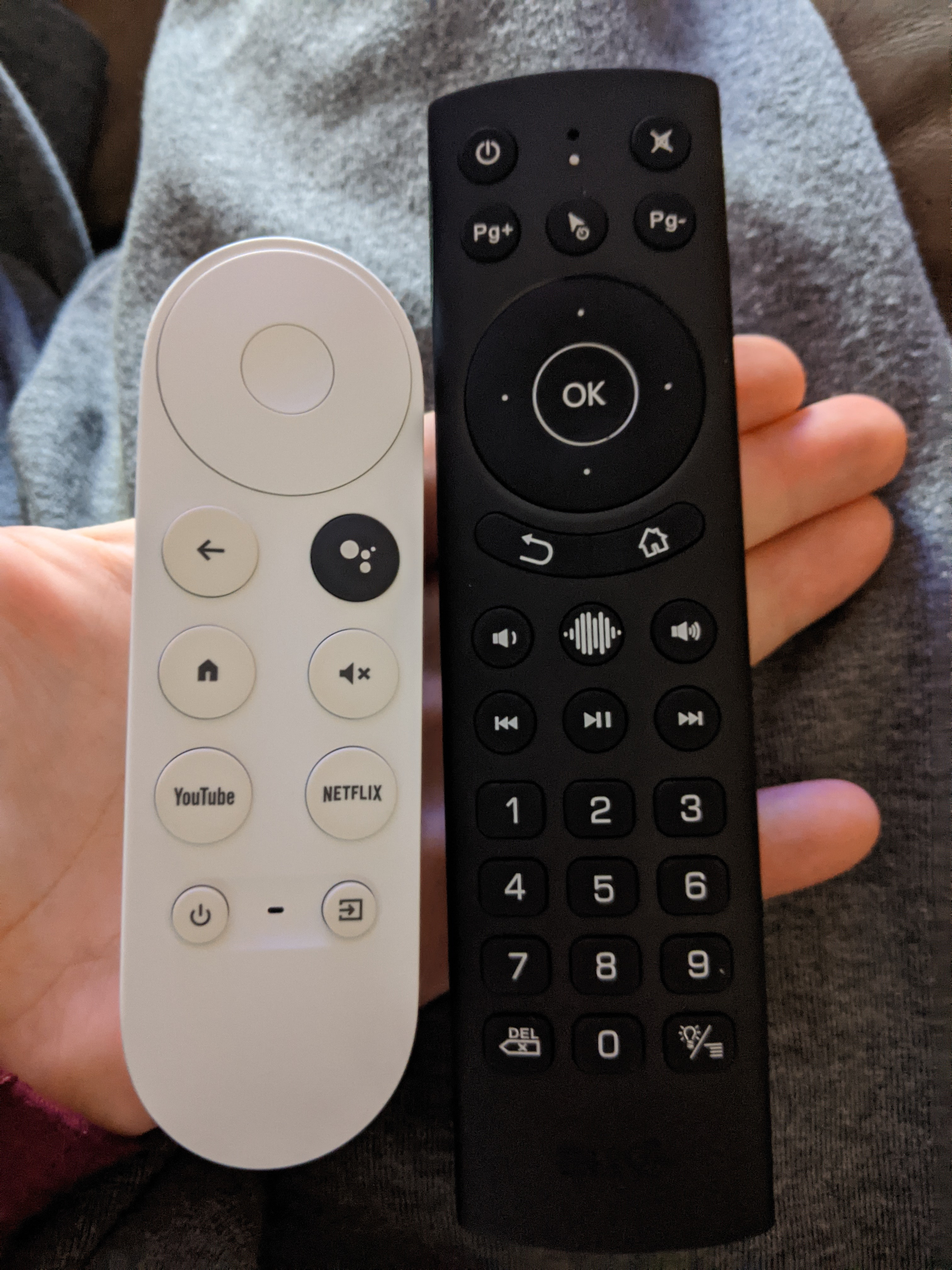
CCwGTV alternative remote

Edit

After using this for the past week I'm returning it, the corner of the remote digs into the palm of my hand and makes using the remote unbearable after a while. This likely only affects those with larger hands.

I was looking for a better remote for the CCwGTV as I can't stand the tiny remote it comes with and happened upon the G20S PRO (pictured below). It works perfectly over Bluetooth and all buttons including air mouse and Google Assistant work out of the box.

The remote also came with a 2.4ghz dongle for use on other devices which may not include Bluetooth.

The remote is backlit and has clicky buttons if you like that sort of thing, I prefer the buttons on the factory remote as they are quieter but I can certainly live with the clicks.

It has a $5 off coupon currently which makes it $15, personally I don't think it's worth $20 but fifteen is a good price.

Here is the link on Amazon but it can also be purchased from AliExpress and likely other China locations.

https://www.amazon.com/dp/B09JSX4JLB

Size Comparison

Backlight

NOTE

I tried it on my Hisense H8G which uses some sort of non-standard remote mappings and the Assistant button wouldn't work and the home button also wouldn't go home. The microphone still worked if you manually click any voice search button on the home screen or inside an app, the home button can be fixed with button mapper but not the Assistant button.

My advice don't buy this for a Hisense Android TV.
3 Answers

iOS notifications on Sony Android TV

Might be a silly question but are there any apps that allow this?

1 Answers

141 / 885

Back to start